2015 Riley Blake Challenge

Riley Blake Cottage Garden by Amanda Herring - photo courtesy of the Modern Quilt Guild
As requested at our meeting Saturday, here is the information about the latest Riley Blake Fabric Challenge hosted by the Modern Quilt Guild.  (Note that you must be signed in to the MQG website to follow the link.)

Riley Blake made 1500 fabric bundles available to MQG members, and each member had to request the fabric on their own.  It took only 8 hours for all 1500 bundles (6 FEs each) to be taken.  However, if you wish to participate, you may purchase fabric to use for your challenge.

Here is the challenge: 
  • Make something fantastic that is quilted.
  • Make something you've never done before.
  • Challenge yourself to learn something new.
  • Use only Riley Blake Cottage Garden fabrics and coordinating Riley Blake basics and solids.  [You may use any Riley Blake basic solid or shade to compliment the Cottage Garden Fabrics. (Riley Blake Basic, solid or shade are generally coded as C100 or C200), suggestions were C100-1, C200-3, C100-12, C200-43, C100-40]
  • The challenge runs from March until July 2015. 
  • Tag all your photos on Facebook and Instagram with #mqgfabricchallenge

Photo courtesy of www.rileyblake.com

If you didn't receive fabric directly from the MQG, you may purchase fabric in any colorway to participate in the Riley Blake Fabric Challenge.  Some prints are available locally at A&E, or you may wish to purchase your fabric online.  A quick check showed fabrics available at Hawthorne Threads, Fabric.com, and Missouri Star Quilts.

The deadline for your quilted creation to be uploaded to the MQG Facebook page, the MQG website or on Instagram is July 31, 2015. You must use the hashtag #mqgfabricchallenge to enter.  I recommend, however, that in addition to posting to FB or IG you upload your photo to the MQG Website here.

ECMQG will be having our own Riley Blake mini-challenge as well.  Bring your creation to the July ECMQG meeting on July 11, 2015 and share your "something fantastic that is quilted" with guild members.  One plus is that if your creation is finished by July 11, it will be done in time to enter into the MQG challenge.

Happy creating!

Introduction to Social Media: The ECMQG Blog, Facebook and the MQG Website


If you are reading this, you have obviously found our ECMQG blog.  The ECMQG Blog is our official communication tool for our membership.  While we try to send emails and update Facebook, the blog is the place where you can find in-depth information about what's happening in the guild.

Parts of the blog are still under construction, but here are some things you can find on the blog:
  • Our meeting schedule:  See the "Meeting and Sewing Schedule" tab under the blog header.
  • Instructions for the current Block Lottery Block.  And check the "Block Lottery" tab for links to past blocks
  • Information about Swaps and Challenges:  Also check the "Swaps and Challenges" tab for info about what we've done in the past.
  • Our charity and outreach work.  Charity and outreach is one of the main goals of our guild.
  • "Quilty Goodness" is where you can find photo inspiration - quilts made by our guild members.
One feature of the blog to be aware of is the blog archive.  Click on any month in the blog archive and a list of posts for that month will appear.  Just click on the post you are interested in to read that post.
Another way we communicate with our members is via the Emerald Coast MQG group page on Facebook. 

 
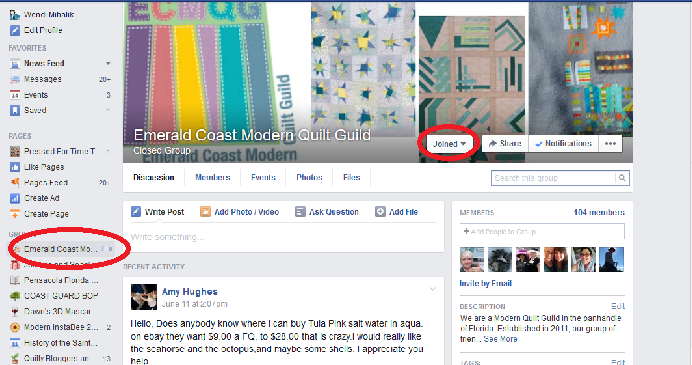
Facebook is a great place for members to share information with one another, ask questions, and interact with other members of the guild.  Our Facebook group is a closed group - in general, only members of the guild are admitted to the group.

Every member of ECMQG is automatically a member of the Modern Quilt Guild.  We would love for every ECMQG member to take advantage of the information on the MQG website.

Naturally, the first step is to accept your invitation to join.  You should have gotten an email with log-in information shortly after you joined ECMQG.  If you have lost your email or have trouble logging in, please contact Wendi Mihalik, Cindy Marvel, or Kim Godwin for assistance.

To access the member features of the MQG website, choose "Community" once you have logged in.

The next page shows current events and announcements.  You may choose to see the most recent posts from all over or only the groups you follow.  If you choose groups you follow, you should see ECMQG's information.  Now choose "Resources."

There is a wealth of information available to our membership here, including access to the Block of the Month, access to Creative Webinars, and access to Business Webinars, for those who want to make quilting a business.

Social media is a huge part of Modern Quilting.  Try it!  Explore!  I hope you will be inspired as you find new sources of inspiration and new outlets for your creativity.


Introduction to Social Media: Instagram


Instagram is an online mobile photo and video sharing social network.  Launched in October, 2010, by December, 2014 Instagram had over 300 million active users! Originally created for the IOS (iPhone and iPad) user, in 2012 Instagram launched their Instagram for Android app, making IG available to pretty much everyone. Unlike Pinterest, 51% of Instagram users are male and 56.4% of users are aged 14-17.  In fact, 51% of the high school class of 2014 reported using Instagram daily and 23% of U.S. teens consider Instagram their most important social media network. 

So, you may ask, what does Instagram have to offer us as quilters?

Instagram feed photo
Lots and lots of eye candy!  An immediate look at what is trendy and fun in the quilting world.  Pictures of my grandchildren (yes, that's often how my family connects!)  And, of course, a way to connect with our friends on social media.  The most interesting thing about IG - and at the same time, its greatest drawback - is that Instagram takes place in real time.  You see what is happening amongst those you follow as it happens.  But, on the other hand, it is easy to miss good information and photos or videos you might like to see. And text capability on IG is very limited, so some of the interactions are superficial at best.

IG Login page

Starting out on Instagram is easy.  Simply create an account using a unique user name and password or log in using your Facebook account.

IG profile page

Once you log in, be sure to set up your profile.  There is a place for a picture and a brief description.  You will want to add your email address and maybe even your phone number for password and login help (email and phone numbers are hidden from your followers and used to reset passwords, etc.)  You might even link other web addresses, such as your blog or your etsy shop, to your IG profile.

IG options page
Once you are in, you might want to visit the settings page to set things up just the way you want them.  Note that if you decide to have a private account, only people you invite can see your posts.

IG search icon is the magnifying glass - this is the people search

Use the magnifying glass icon to search for people you know.  You can search by user name if you know it...

IG search screen - this is the subject/hashtag search

Or by hashtag.  Search for or tag people using the "@" symbol.  Search for things using the "#" (hashtag) symbol. Remember that you can only search for things if you know how they are labeled. You will certainly want to search #ecmqg often.

IG Camera icon - bottom of home screen

Once you have your account set up, post your first photo.  Choose the camera icon in the center of the bottom of your home screen.  I strongly recommend that you use hashtags for your photos.  For some reason, photos without hashtags tend to attract spam and unwanted followers.  If that happens, you can tap on the person's user name and block them.  If the content is unacceptable, you can report the post to have it removed.

IG picture upload screen
 Now upload your first photo.  Instagram links directly with your photo album on your phone for instant access.  Choose the photo you want to use...

Note the word NEXT in the upper right corner.
Choose the back arrow on the left if you want to start over.  When you're ready, tap NEXT in the upper right corner...

Instagram photo tools screen
Instagram provides a number of built-in filters for you to use and a handy tool icon for cropping, straightening or other tweaks to your photo. (Note that there are also a number of free and low-cost third party apps such as Pic-Tap-Go, LiPiX, VSCOcam and Snapseed that you can use to enhance your photos right on your phone.)  Once your photo is just the way you want it, tap NEXT again.

Instagram Photo caption screen
Finally, add your caption.  You can use the @ symbol if you want to mention other IG users in your caption or TAG them if you want to see your picture.  Here is where you can simultaneously post your photo on Flickr, Facebook, Twitter, or Tumblr.  Now tap SHARE to upload your photo.


Instagram profile page

The person icon on the right is your personal profile screen.  You can see your profile, picture, and all the photos you've uploaded here.  The photos are loaded newest first, so just scroll down to see your older photos. 

IG Activity page
You can see any activity related to you and the photos you have posted by clicking on the heart icon at the bottom of the screen.  Notice at the bottom of the screen that I have a new follower.  If I want to follow her also, I can just tap the +1 icon and she will be added to my following page.

IG home screen with Inbox icon
One newer feature of Instagram that helps you connect with others is the Inbox icon located at the top of the screen on your home page.   If you tap the inbox icon, you can send a direct private message to another IG user.   Really handy for sending a quick message and photo to someone.  The information that you have a message shows up on your activity page.

Like other social media, IG has its benefits and its drawbacks, but it is a great way to see what is going on in the quilting world, and with other topics you might be interested in.  Check it out!


Introduction to Social Media: Pinterest


Pinterest is perhaps one of the most versatile social media sites on the web.  Basically an online bulletin board, Pinterest allows users to catalog and file objects from other web sites so they can be found later.  Created in 2010, by May, 2015 Pinterest boasted 72.8 million users from all over the world, 85% of whom are women.  It is estimated that 42% of American women use Pinterest.  Over 1 billion Pinterest boards have been created containing more than 50 billion Pinterest pins.  Pinterest is available from your desktop/laptop computer, and has had an app for your mobile device since early 2011.  Pinterest is truly a social media phenomenon.

Pinterest login screen

You can create your Pinterest account using your email address, or your Facebook account.  Choose a password, and you can get started "pinning" the things that interest you on the web.

Pinterest boards
Once you open your Pinterest account, you can catalog your interests by creating "Boards."  Each board holds photos related to various topics that interest you.  You give the boards their names, and you control the content you pin.  Notice that my first board is "abby-girl and baby britton."  This is my board relating to my grandchildren - things I want to make for them and things I want to do for them - even photos of them I found on the net. 

The individual pins in a Pinterest board

This is my board called "Bags and Totes."  This is the board where I pin bags and totes I might want to make one day, or bags that I might use for inspiration for my own creations. 

Individual pin with link to specific website
When you click the individual pin, it takes you to that particular photo.  The best part about the pin is that it also saves the information from the particular website so that you can find your way back to the specific post.  So, if I wanted to make this wallet, by clicking on the pin I could find my way back to the tutorial post.


Pinterest home page

 Once you have created your Pinterest account, your home page will show you random pictures posted by others....

Pinterest followers page
But as you begin creating social links with others on Pinterest - following other pinners and having others follow you - you will begin seeing things posted by the people you follow, which is bound to show you others' pins that reflect your interests....

Pinterest search - "modern quilts"

and if it doesn't, use the search feature in the upper left corner to search for things that interest you.  Here, I have searched for "modern quilts."  The search result will be objects that others have tagged as modern quilts or posted to modern quilts boards.
 
Individual pin with "Follow Board" link in the upper right corner

 When you click on an individual pin, in addition to the website information located at the bottom of the photo, along the side you may see one or more boards the pin has been pinned to.  Like what you see?  Click the "Follow Board" link.  Now, everything that person pins to their board will come up in your feed, and you will be able to see everything they pin on that board.


Sometimes you may want to share a board with someone else.  In this case, a few of us share a board called "Modern QOV Ideas."  This is a place to pin ideas and inspiration for Quilts of Valor.  Owners of a board may invite others to pin to the board so they can share the inspiration they find relating to a specific topic. 


Pinterest even has a handy PinIt button you can add to your task bar to make it easy to pin as you are surfing the web.  So, why not get started? 

One word of caution:  Pinterest can be habit-forming!


Introduction to Social Media: Flickr and Big Huge Labs


According to the Modern Quilt Guild website, "The growth of the [modern quilting] movement was facilitated by four factors: the cultural shift of quality design being recognized by the general public, affordable digital cameras, the changing fabric industry and the rise of social media."  These four factors are the foundation of the Modern Quilt Movement.  The Modern Quilt Guild article continues, "The Flickr group Fresh Modern Quilts, established in 2008, provided the first online centralized social media venue for quilters in the movement. With that Flickr group and many active blogs, the online world of modern quilting took off like wildfire."


Started in 2004, Flickr was the original online digital photo hosting and sharing program.  Flickr provides up to 1,000GB of storage per user.  In addition, people could post their photos in an online format where others could see them. 

Flickr also had the capability of fostering an online community, allowing people to comment on others' photos and file their favorites away for later viewing and inspiration.  Accordingly, the online community format fostered the building of online relationships and people began to form groups based on their interests.  For the crafts and quilting communities, Flickr was the perfect venue for facilitating online bees and swaps.  According to Wikipedia, in March, 2013, Flickr boasted more than 87 million members who upload more than 3.5 million photos each day.

Unfortunately, in the summer of 2013, Flickr's focus seemed to move away from the idea of community to a more photo-centric ideal.  Rather than present photos in a web-friendly format, as it had done from its inception, Flickr presented digital photos in their full resolution.  This caused several issues for users - slow uploads, an increase in data usage, and an increase in cost for those who paid for their internet service by the amount of data they used.  In addition, to focus on photographs, Flickr minimized the comments features and made them harder to use, which impacted users negatively.  At the same time, Instagram was becoming more popular and many Flickr users shifted to Instagram to avoid some of the new difficulties with Flickr.

Flickr Fresh Modern Quilts Group Home Page
In its heyday, as Flickr users formed online relationships and gravitated to the kinds of photos they enjoyed, they formed groups based on their interests.  As mentioned in the MQG quote above, the Fresh Modern Quilts group shown in the above screen shot was instrumental in fostering the Modern Quilting movement.

ECMQG Flickr Photo Pool

Creating a Flickr account is easy.  If you already have a Yahoo account, all you need to do is sign in to Flickr - your Yahoo sign on and password work with Flickr as well.  If you don't have a Yahoo account, simply go to www.Flickr.com and click the Sign Up button at the top of the page.  Complete the information requested on the form and voila! - you're a Flickr member.  Click the upload button and begin uploading your own photos to Flickr.  You will certainly want to join the ECMQG Flickr Group!

Flickr Fresh Modern Quilts - Group Photo Pool
In the various groups, members could upload their own photos and see the photos posted by others in the group.  Group moderators could also monitor the photos uploaded to make sure they were appropriate to the group's aesthetic.  In addition, group moderators could invite the owners of photos to post them in the group if they felt photos met the criteria.  Moreover, other Flickr members could "like" and "favorite" photos, as well as make comments.  These features created a sense of community as members from all over the world got to know one another through both their photos and comments.


My most recent Flickr favorites
Because you could "favorite" (or "fave") photos you liked on Flickr, you could take those same photos and create mosaics and galleries of pictures you found inspirational.  This feature was often used for swaps to tell others what kinds of things you might like to have made for you.  In fact, some swaps required a mosaic in order to enter the swap.

My most recent inspiration mosaic
One helpful online tool for creating photo mosaics is www.bighugelabs.com.  While they have many photo tools available, their mosaic maker tool was a vital part of Flickr photo sharing.  It is versatile and easy to use.  By selecting various options, you can create a mosaic using up to 36 different images either from the photos on your computer, from Facebook, or from your Flickr photos or your Flickr favorites.  Big Huge Labs offers several different formats for presenting your mosaics as well.

BHL Choice Screen
Again, creating a BHL account is easy!  You can sign up with your email address, Google or Facebook.  Once you have an account, link to Flickr or Facebook and creating mosaics is a matter of choosing your photos and clicking "Create".

While the social media platform may have changed, social media is still essential to the Modern Quilting movement.  Online sharing and inspiration from people all over the world is a vital part of modern quilting.

Introducing Modern Designers - Tula Pink - A Fabric Swap

One of our goals as a guild is to introduce our members to the fabrics and inspiration of modern designers.  No discussion of modern designers would be complete without including Tula Pink!  Tula has almost a cult following of #tulatroops with over 12,000 posts on Instagram who love, use, swap, and collect her fabrics, recreate her designs, and adore all things Tula.  The #tulapink hashtag has more than 20,000 photos on IG. Tula's designs are unique, bold, and whimsical.  Her early fabric lines are much in demand and should you find such out-of-print fabrics, they might sell for as much as $150 per yard.

The signature print in Tula's new Elizabeth line.


Tula Pink describes herself as "an illustrator, a fabric designer, a quilter, an author, a maker, and a generally good person" who took the fabric industry by storm in 2007 with her first line, Full Moon Forest.  Her 12th fabric line, Elizabeth, has just recently come on the market, as has her rendition of True Colors, a designer series done by various Free Spirit designers (including Anna Maria Horner, Joel Dewberry and others).


A needlebook made with Tula Pink's Prince Charming fabric.

We will swap modern fat eighths of fabrics by Tula Pink at our June meeting.  You still have time to purchase your fabrics and participate in the swap.  A limited selection of Tula Pink fabrics are available locally at A&E or you may wish to purchase your fabrics online.

Instructions for cutting modern fat eighths are below:

What is a Fat Eighth?
A fat eighth (FE or F8) is one eighth of a yard of fabric, or a yard of fabric cut into eight equal pieces. Traditionally, this long narrow cut from the fold line to the selvage, resulted in 8 strips measuring 4-1/2" x 44".  


Like the Fat Quarter, quilters changed the cutting dimensions of of that same yard of fabric to be both longer and wider by doubling the width and halving the length and ended up with a piece 9" x 22", and called it a Fat Eighth.  A fat eighth has so many more possibilities for quilting than a long, skinny 1/8 yard piece. 


Modern quilters still found this cut too confining, and realized by changing the cutting dimensions yet again, shorter fatter pieces were even more user friendly.   This newer cut, still a FE or F8, and hugely popular with modern quilters is sized at 11" x 18" or 10.5" x 18" (after selvages are removed).
  

The Rules

If you wish to participate, here is what you need to do:

1.  Purchase one yard of any Tula Pink printed quilting cotton fabric.   Some possible sources for your fabric might be:

A&E Pharmacy in Pensacola, or online from Hawthorne Threads, Fat Quarter Shop,  Fabric dot com, Intrepid Thread and Fabricworm.

Be sure to buy 100% cotton quilting fabric.  This is not a swap for velveteen, flannel, corduroy, voile, laminate, home decorator, or other fabric types.


2 - You may swap up to three yards of fabric (minimum of 1 yard each of 3 different designs).

3.  Cut your fabric using the tutorial below.

4.  Place your cut fabric in a zip top bag labeled with your name.  To make it easy for our swap team, each fat eighth of fabric should be folded individually.  If you are swapping more than 1 yard, place each SEPARATE yard in a labeled zip top bag.

5.  Leave your labeled bag(s) on the designated swap table at the meeting.

6.  Your fabric(s) will be sorted and separated by groups.  At the conclusion of our meeting, drop by the swap table and pick up your beautiful bundle(s) of modern designer fabric.

7.  We won't have a variety of prints if everyone purchases and brings the same fabric.  Please utilize our Facebook page to let us know what fabric(s) you've selected.  With the number of participants we are anticipating, it should be okay to have no more than two or three people bring the same print.


Cutting Modern Fat Eighths

1.  Press your fabric to remove the center crease.  Do not remove the selvages.

2.  Using your rotary cutter, cut your fabric lengthwise through the center.  You now have two pieces, measuring approximately 22" x 36".


3.  Cut each 22" x 36" piece in half again lengthwise.  This gives you four pieces, each measuring 11" x 36"


4.  Cut each 11" x 36" piece in half crosswise.  This gives you eight pieces, each measuring 11" x 18".  A modern fat eighth.

(Note that the width of the fabric may vary, which may make your F8 somewhat less than 11"; if you cut your fabric width into equal quarters, it will be close enough.)


As always, if you have questions regarding the swap or this tutorial, you can email me at wendimihalik at yahoo dot com.

The End of an Era

 Hello Modern Quilters! Thank you for visiting our blog. Sadly, ECMQG is no longer meeting on a regular basis. Feel free to browse the blog,...